From Solo AI Engineer to Autonomous Dev Team
Overview
In a previous post, the AI Digital Engineer pattern was introduced, featuring a single Claude Code agent guided by Skills and enforced by Hooks to execute a complete engineering workflow. This approach demonstrated effectiveness in delivering production-ready code with guaranteed quality gates.
However, a fundamental limitation emerged: one agent performing all tasks.
This limitation highlighted the need for a multi-agent system, where a team of AI agents, each with a distinct role, could collaborate autonomously to transform GitHub issues into merged pull requests without human intervention.
The Limitation of a Solo AI Engineer
The single-agent approach detailed in the previous post is suitable for interactive development workflows. A human creates an issue, initiates Claude Code execution, monitors progress, and triggers reviews. While the Skills + Hooks architecture ensures quality, human oversight is required for orchestration.
This approach presents several bottlenecks:
- Manual dispatch — Each task requires manual assignment to the AI agent.
- Self-review — The same agent responsible for code generation also performs the review, potentially reducing objectivity.
- Sequential processing — Tasks are processed one at a time, dependent on human checkpoints.
- No crash recovery — Progress is lost if a session terminates unexpectedly.
The objective is to establish a system where agents emulate a conventional engineering team structure: a tech lead assigns work, a developer implements features, and a reviewer independently verifies quality — all operating autonomously.
Introducing the Autonomous Dev Team
The Autonomous Dev Team establishes a fully automated development pipeline that automates the transformation of GitHub issues into merged pull requests, eliminating human intervention. It is powered by OpenClaw as the orchestration layer and supports multiple AI coding CLIs: Claude Code, Codex CLI, and Kiro CLI.
The architecture emulates a standard engineering team with three distinct roles:
 1┌──────────────────────────────────────────────────────────────────────┐
 2│                     Autonomous Dev Team                              │
 3├──────────────────────┬───────────────────┬───────────────────────────┤
 4│  Dispatcher          │  Dev Agent        │  Review Agent             │
 5│  (OpenClaw)          │  (Claude/Codex/   │  (Claude/Codex/           │
 6│                      │   Kiro)           │   Kiro)                   │
 7├──────────────────────┼───────────────────┼───────────────────────────┤
 8│ • Scans issues       │ • Reads issue     │ • Finds linked PR         │
 9│   every 5 minutes    │   requirements    │ • Checks merge conflicts  │
10│ • Dispatches agents  │ • Creates worktree│ • Runs review checklist   │
11│ • Manages labels     │ • Implements TDD  │ • Verifies E2E tests      │
12│ • Handles crashes    │ • Creates PR      │ • Approve or reject       │
13│ • Enforces           │ • Marks checkboxes│ • Auto-merge on pass      │
14│   concurrency        │ • Resumes sessions│ • Posts structured        │
15│   limits             │                   │   findings                │
16└──────────────────────┴───────────────────┴───────────────────────────┘
How It Works: The Label-Based State Machine
The entire workflow is driven by GitHub issue labels. Each label represents a state, and agents transition between states based on their outcomes:
flowchart LR
    A[Issue Created] -->|autonomous label| B[Dispatcher Picks Up]
    B -->|adds in-progress| C[Dev Agent Working]
    C -->|success| D[pending-review]
    C -->|crash| D
    D -->|dispatcher cycle| E[Review Agent Working]
    E -->|PASS| F[approved + merged]
    E -->|FAIL| G[pending-dev]
    G -->|dispatcher cycle| C
There is no central database or message queue. GitHub labels serve as the single source of truth. The dispatcher polls every 5 minutes, reads the labels, and executes predefined actions:
| Current Labels | Action |
|---|---|
autonomous (no state label) | Dispatch Dev Agent (new session) |
autonomous + pending-review | Dispatch Review Agent |
autonomous + pending-dev | Dispatch Dev Agent (resume session) |
autonomous + approved | Done — PR merged |
The Three Agents in Detail
Agent 1: The Dispatcher (OpenClaw)
The dispatcher functions as the team's tech lead. It operates on a cron schedule (every 5 minutes), scans for actionable issues, and spawns the appropriate agent:
 1# Dispatcher workflow (simplified)
 2# 1. Check concurrency — don't exceed MAX_CONCURRENT (default: 5)
 3# 2. Find issues needing work
 4# 3. Spawn agent via nohup background process
 5# 4. Detect stale processes and recover
 6
 7# Example: dispatching a dev agent
 8dispatch-local.sh dev-new $ISSUE_NUM
 9
10# Example: dispatching a review agent
11dispatch-local.sh review $ISSUE_NUM
12
13# Example: resuming after review rejection
14dispatch-local.sh dev-resume $ISSUE_NUM $SESSION_ID
Key capabilities include:
- Concurrency control — Tracks active processes via PID files, adhering to the
MAX_CONCURRENTlimit. - Crash recovery — Detects terminated processes and transitions stale
in-progressissues topending-review. - Session tracking — Extracts session IDs from comments for resumable development.
- Self-correction — Manages edge cases such as unintended re-dispatching of already-approved issues.
Agent 2: The Dev Agent (Developer)
The Dev Agent serves as the implementer. Upon dispatch, it performs the following:
- Reads the issue — Parses requirements and acceptance criteria.
- Creates an isolated worktree — Utilizes
git worktree addto prevent cross-contamination between parallel tasks. - Follows TDD — Writes tests prior to implementation, guided by the
autonomous-devskill. - Marks progress — Checks off requirement checkboxes in the issue as each is completed.
- Creates a PR — Includes
Closes #<issue-number>to link the issue. - Reports results — Posts a structured session report with a session ID for resumability.
The Dev Agent supports two modes:
- New — Executes fresh implementation from scratch.
- Resume — Continues a previous session, processing review feedback and resolving issues without re-implementing completed work.
Agent 3: The Review Agent (Reviewer)
The Review Agent acts as the quality gate. It operates independently from the Dev Agent (utilizing a different model and session) and adheres to a strict checklist:
- Find the PR — Locates the pull request linked to the issue via
Closes #Nreferences. - Check merge conflicts — If conflicts are present, it performs a rebase onto the main branch and force-pushes.
- Run review checklist — Executes 10 items covering process compliance, code quality, testing, and infrastructure safety.
- Trigger external reviews — Posts
/q reviewto invoke Amazon Q Developer for static analysis. - Run E2E tests — Uses Chrome DevTools MCP to verify on the preview deployment.
- Execute the Findings→Decision Gate — This critical step prevents inconsistent verdicts.
The Findings→Decision Gate is a mandatory self-check: the review agent enumerates all findings, classifies each as BLOCKING or NON-BLOCKING, and only approves if there are zero blocking findings. This mechanism prevents the common failure mode where an agent provides a positive assessment despite listing problems.
Real-World Workflow: A Complete Example
This section details a real feature implementation, illustrating the collaborative workflow of the three agents. This example originates from a production Next.js application where the autonomous dev team manages feature implementation and bug fixes.
Phase 1: Issue Created and Dispatched
A feature request is created with the autonomous label — to add swipe gestures for day navigation on mobile. The dispatcher picks it up within 5 minutes:
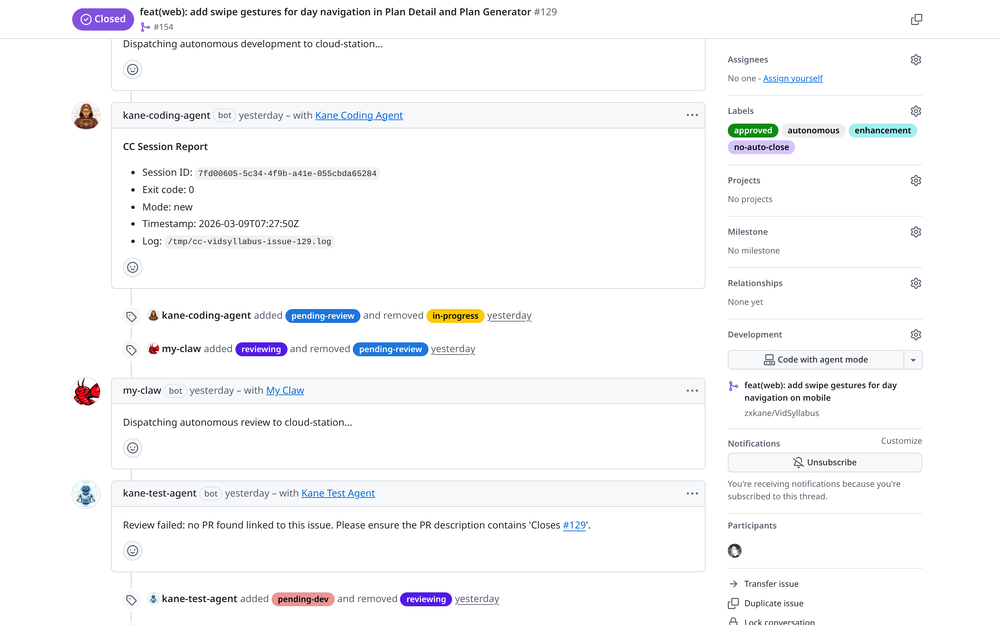
The dispatcher (my-claw) picks up the issue and spawns the dev agent (kane-coding-agent). The dev agent reports its session for resumability. The review agent (kane-test-agent) then takes over.
The dispatcher adds the in-progress label, spawns the dev agent, and initiates monitoring. Upon dev agent completion (exit code 0), the dispatcher transitions the issue to pending-review and spawns the review agent.
Phase 2: Review Agent Rejects with Structured Findings
The review agent executes its full checklist and identifies 5 blocking issues:
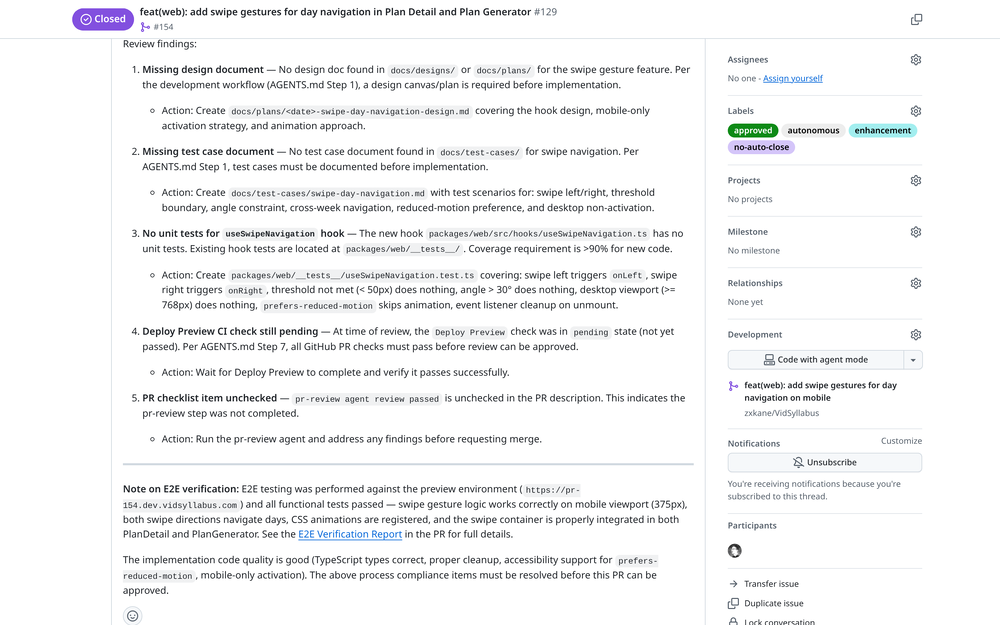
The review agent posts structured findings: missing design document, missing test cases, no unit tests, pending CI, and unchecked PR checklist. Each finding includes a specific action item.
This scenario demonstrates the value of the multi-agent architecture. A single agent performing self-review may overlook deficiencies in documentation or process adherence. An independent review agent identifies process violations that an implementing agent might bypass due to task-specific incentives.
Phase 3: Dev Agent Self-Corrects
The review rejection triggers the dispatcher to transition the issue back to pending-dev. The dev agent resumes its previous session and addresses all 5 findings:
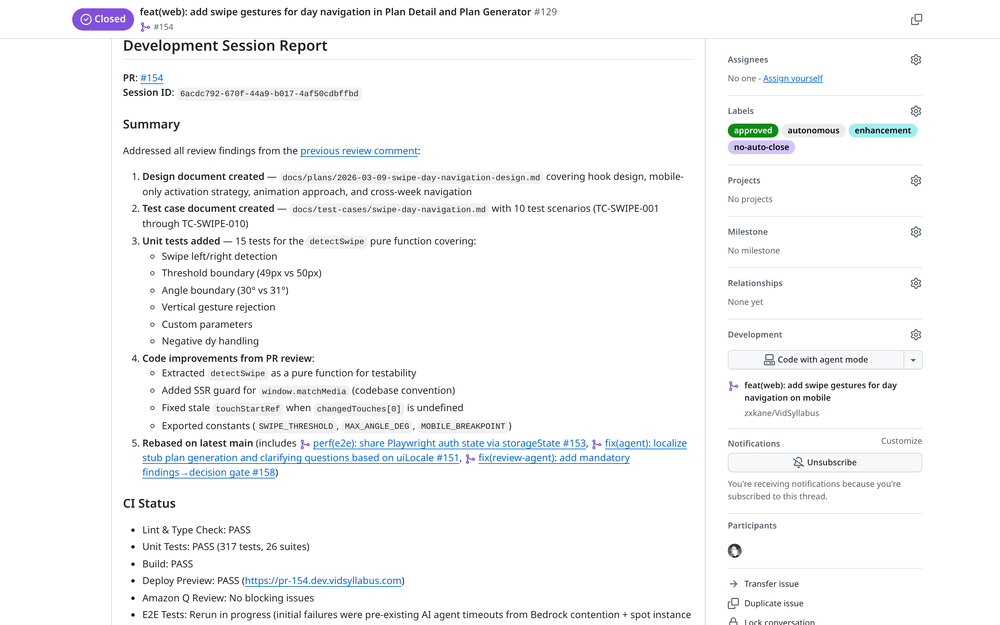
The dev agent addresses all review findings: creates design document, adds test case document with 10 scenarios, writes 15 unit tests, extracts a pure function for testability, and rebases on latest main.
The dev agent independently identified and addressed required fixes. It processed the review comment, comprehended the requirements, and systematically addressed each point, notably by extracting detectSwipe as a pure function for enhanced testability.
Phase 4: Review Passes
The review agent re-executes its checklist. This time, all items pass:
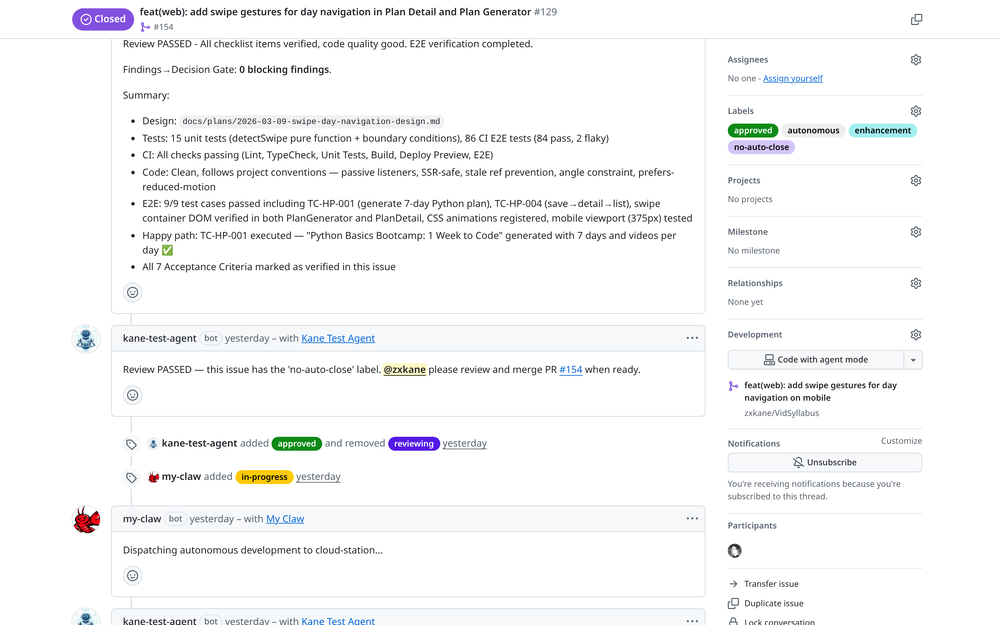
Review PASSED with 0 blocking findings. The review agent verified design docs, 15 unit tests, all CI checks passing, E2E tests on preview deployment, and all 7 acceptance criteria.
The review agent approves the PR. Since this issue includes the no-auto-close label, it notifies the maintainer for manual merging instead of automatic merging.
A Bug Fix in Under an Hour
The team also manages bug resolutions with the same pipeline. Presented here is a CJK character encoding bug — from issue creation to merged PR in under one hour:
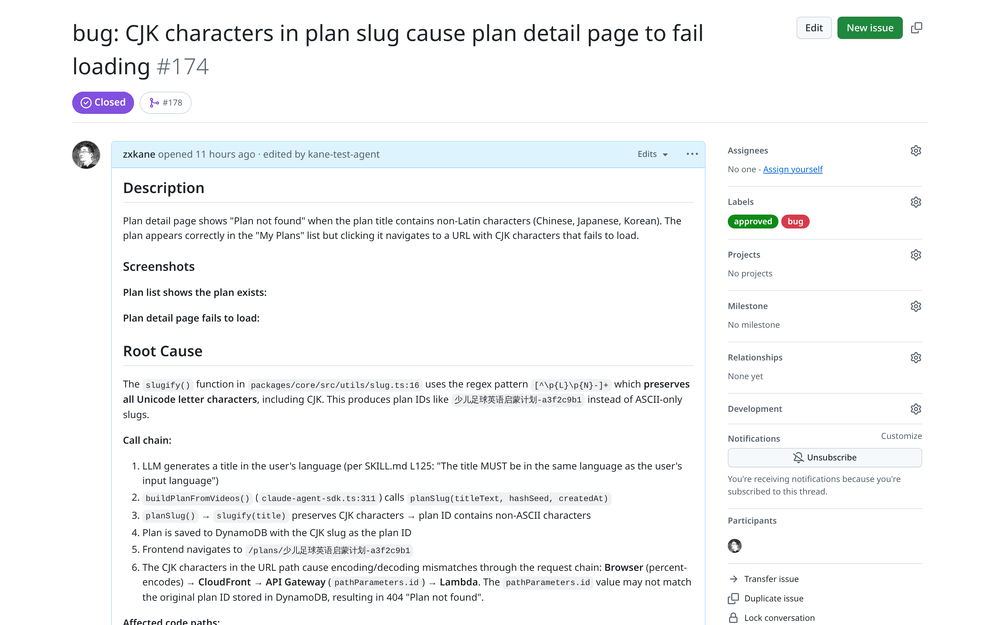
A bug report: CJK characters in plan slugs cause the detail page to fail loading. The issue includes screenshots showing the broken behavior.
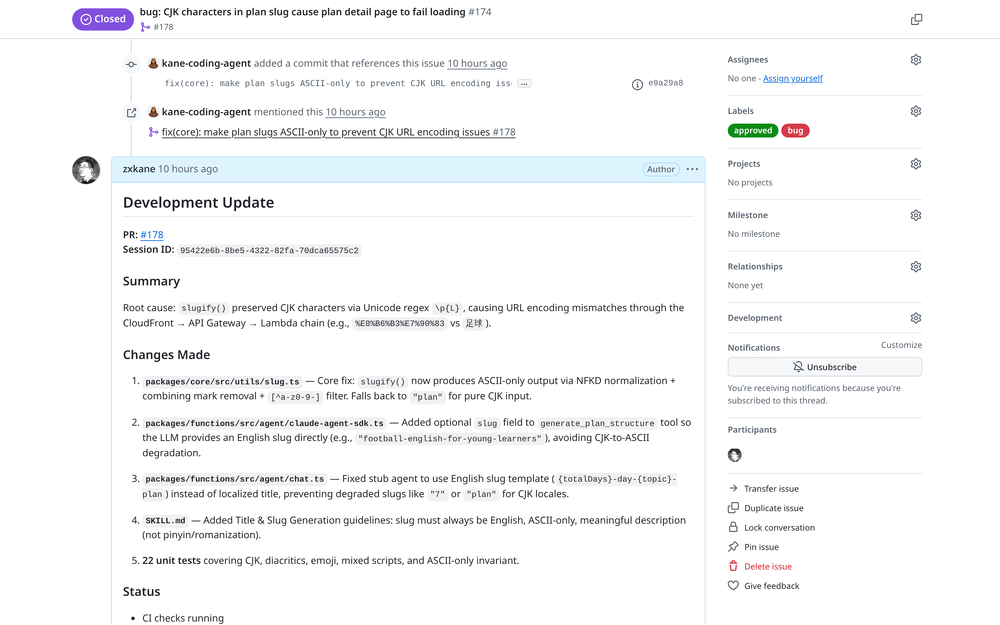
The dev agent's root cause analysis: slugify() preserved CJK via Unicode regex, causing URL encoding mismatches through CloudFront → API Gateway → Lambda. Fixed with NFKD normalization and 22 unit tests.
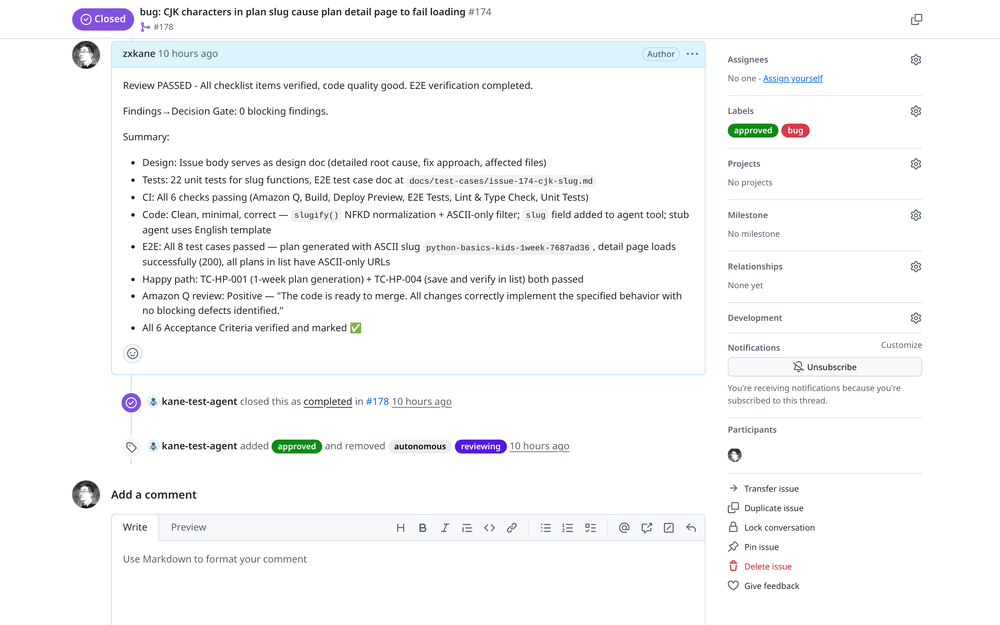
Review passed with 0 blocking findings. The review agent verified all 6 acceptance criteria, 22 unit tests, E2E tests with ASCII-only URLs, and Amazon Q's positive review. Issue auto-closed.
The dev agent did not merely address the symptom; it conducted a thorough root cause analysis, identified the URL encoding mismatch within the CloudFront → API Gateway → Lambda chain, and implemented a comprehensive fix with 22 unit tests covering CJK, diacritics, emoji, and mixed scripts.
CI/CD as the Final Quality Gate
Autonomous agents can write code, but shipping reliable software demands more than passing an AI review. The Autonomous Dev Team integrates traditional software engineering practices — CI/CD pipelines, automated testing, and bot-assisted static analysis — as non-negotiable quality gates that agents cannot bypass.
Why CI/CD Matters for AI-Generated Code
AI coding agents are prone to subtle failures that only surface during build or runtime: type errors caught by the compiler, import paths that work locally but break in CI, or dependency mismatches between environments. Without a CI pipeline enforcing these checks, an agent could generate code that "looks correct" in its session but fails in production.
The template enforces a strict progression:
flowchart LR
    A[Agent Writes Code] --> B[Pre-push Hooks]
    B --> C[PR Created]
    C --> D[GitHub Actions CI]
    D -->|pass| E[Bot Reviewers]
    E --> F[E2E Tests]
    F -->|all pass| G[Review Agent Approves]
    D -->|fail| H[Agent Fixes and Retries]
    E -->|findings| H
    F -->|fail| H
Hook-Enforced Quality Checkpoints
Claude Code hooks act as local gatekeepers that block agent actions until quality conditions are met:
| Hook | Trigger | Enforcement |
|---|---|---|
check-unit-tests | Before git commit | Warns if unit tests haven't been run for code changes |
check-pr-review | Before git push | Blocks push until PR review skill has been executed |
verify-completion | Before task completion | Blocks completion unless CI passes, E2E tests run, and all review threads resolved |
block-push-to-main | Before git push | Prevents direct pushes to main branch |
block-commit-outside-worktree | Before git commit | Ensures all work happens in isolated git worktrees |
The verify-completion hook deserves special attention. It queries the GitHub API in real-time to check CI status, counts unresolved review threads via GraphQL, and verifies that E2E tests have been executed. The agent cannot claim the task is complete until every checkpoint is green.
GitHub Actions and Bot Reviewers
When a PR is pushed, GitHub Actions runs the project's standard CI pipeline — linting, type checking, unit tests, build verification, and preview deployment. These are the same checks that would gate a human developer's PR.
The review agent also integrates with bot reviewers like Amazon Q Developer for static analysis. It triggers a review via /q review, waits for findings, and either addresses them or documents design decisions before resolving each thread. This creates a layered defense:
- Local hooks — Catch issues before code leaves the agent's session
- CI pipeline — Validates build integrity, test coverage, and deployment
- Bot reviewers — Static analysis from independent tools (Amazon Q, Codex)
- Review agent — Holistic assessment with E2E verification on the preview environment
E2E Tests on Preview Deployments
The review agent doesn't stop at code-level checks. Using Chrome DevTools MCP, it navigates to the preview deployment URL, executes happy-path test cases, verifies authentication flows, checks for console errors, and captures screenshots as evidence. These screenshots are uploaded and linked in the PR as a verification report.
This approach mirrors what a senior engineer would do during a thorough review: deploy the branch, click through the feature, and confirm it works end-to-end — except the agent does it automatically on every review cycle.
The system supports multiple AI coding CLIs through an abstraction layer:
 1# scripts/lib-agent.sh — Agent CLI abstraction
 2run_agent() {
 3  case "$AGENT_CMD" in
 4    claude)
 5      claude --session-id "$SESSION_ID" \
 6             --model "$MODEL" \
 7             -p "$PROMPT" \
 8             --allowedTools "$TOOLS"
 9      ;;
10    codex)
11      codex -p "$PROMPT" \
12            --model "$MODEL" \
13            --approval-mode full-auto
14      ;;
15    kiro)
16      kiro -p "$PROMPT" \
17           --model "$MODEL" \
18           --non-interactive
19      ;;
20  esac
21}
| Feature | Claude Code | Codex CLI | Kiro CLI |
|---|---|---|---|
| Dev Agent | Full support | Basic | Basic |
| Review Agent | Full support | Basic | Basic |
| Session Resume | Native (--session-id) | Falls back to new | Falls back to new |
| Model Selection | Configurable | Configurable | Configurable |
Claude Code offers the most comprehensive integration, particularly regarding session resumability, which facilitates the review→fix→re-review cycle without re-implementing completed work.
Authentication: GitHub Apps for Audit Clarity
Each agent can operate as a distinct GitHub App bot, providing clear audit trails:
1kane-coding-agent[bot]   → Dev Agent actions (commits, PR creation)
2kane-test-agent[bot]     → Review Agent actions (reviews, approvals)
3my-claw[bot]             → Dispatcher actions (label changes, comments)
This makes it straightforward to trace agent activities. The accompanying screenshots illustrate distinct bot avatars and identities, providing the same visibility as a human team.
The system also supports a simpler token-based mode where all agents share one identity, which is simpler for initial setup.
Getting Started
1. Use the Template
The autonomous-dev-team repository is a GitHub template. Utilize the "Use this template" button to create your own copy:
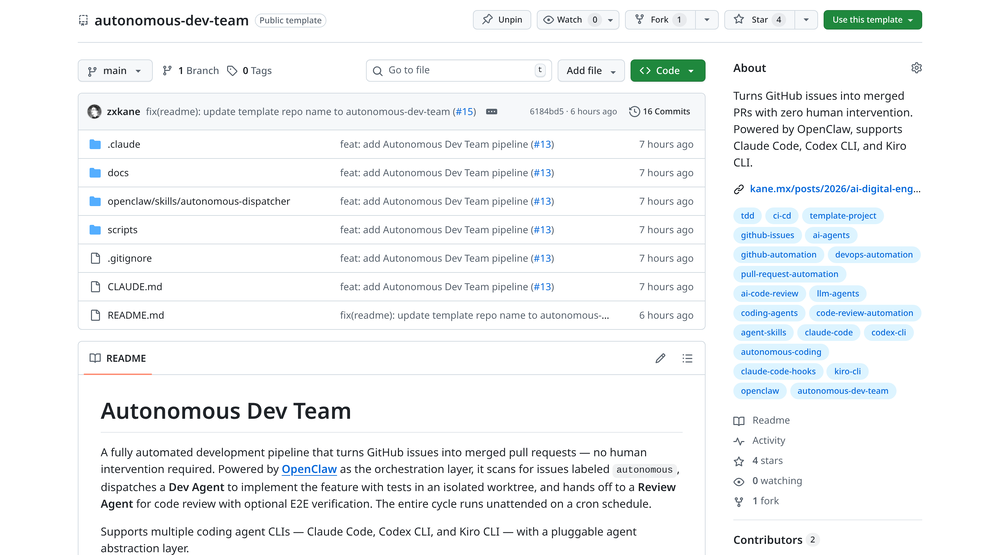
The autonomous-dev-team template repository on GitHub — ready to use with Claude Code, Codex CLI, or Kiro CLI.
2. Configure Your Project
1# Copy the config template
2cp scripts/autonomous.conf.example scripts/autonomous.conf
3
4# Edit with your settings
5cat scripts/autonomous.conf
 1# Project identification
 2PROJECT_ID="my-project"
 3REPO="myorg/my-project"
 4PROJECT_DIR="/path/to/my-project"
 5
 6# Agent CLI selection (claude, codex, or kiro)
 7AGENT_CMD="claude"
 8
 9# Authentication mode (token or app)
10GH_AUTH_MODE="token"
11
12# Concurrency
13MAX_CONCURRENT=5
3. Set Up OpenClaw Dispatcher
Install OpenClaw and configure the dispatcher cron:
1# Run dispatcher every 5 minutes
2*/5 * * * * cd /path/to/autonomous-dev-team && openclaw run
4. Create an Issue with the autonomous Label
Create a GitHub issue, add the autonomous label, initiating the automated pipeline. Within 5 minutes, the dispatcher will spawn a dev agent, which will implement the feature, create a PR, and hand it off for review.
From Solo to Team: What Changed
| Aspect | Solo AI Engineer | Autonomous Dev Team |
|---|---|---|
| Orchestration | Human initiates each task | Dispatcher auto-assigns from issues |
| Review | Self-review (same agent) | Independent review agent |
| Concurrency | One task at a time | Up to 5 parallel tasks |
| Crash Recovery | Lost progress | Auto-retry with session resume |
| Audit Trail | Single conversation | Separate bot identities per role |
| Human Involvement | Initiate, monitor, approve | Create issue, optionally final merge |
| Agent CLI | Claude Code only | Claude Code, Codex CLI, Kiro CLI |
| Quality Gates | Manual CI check | Hook-enforced CI, bot review, E2E verification |
The Skills + Hooks architecture from the previous post continues to power each individual agent. The key innovation lies in the orchestration layer — comprising the dispatcher for work assignment, the label-based state machine for progress tracking, and the separation of implementation from review.
Conclusion
The evolution from a solo AI engineer to an autonomous dev team parallels the growth observed in human engineering organizations. The initial phase involves a single capable developer (the AI Digital Engineer), which then scales to a team with specialized roles and clear handoff protocols.
The Autonomous Dev Team template provides:
- Zero human intervention — Issues automatically progress to merged PRs.
- Independent review — Development and review agents operate with separate sessions and models.
- Crash resilience — A label-based state machine with automatic retry functionality.
- Multi-CLI support — Compatibility with Claude Code, Codex CLI, and Kiro CLI via a pluggable abstraction.
- Traditional quality gates — CI/CD pipelines, bot reviewers, and E2E tests that agents cannot bypass.
- Clear audit trails — GitHub App bots provide distinct per-agent identities.
The code is open source and available as a GitHub template. Implement it in a small project, observe the agents' collaboration, and subsequently scale its application.
Resources
- Autonomous Dev Team Template — GitHub template with full pipeline setup
- OpenClaw — The orchestration engine that powers the dispatcher
- AI Digital Engineer (Previous Post) — The single-agent pattern that each agent follows internally
- Claude Code Hooks Documentation — Quality gate enforcement
- Claude Code Skills Guide — Workflow orchestration